Private Dictation Software: The Complete Guide to Secure Voice Typing
Dictation tools are fast and convenient - but not always private. When you use voice typing, your words aren’t just converted into text. In many cases, they’re also sent to external servers, processed remotely, and sometimes even stored without you fully realizing it. That’s where private dictation software comes in - tools designed to keep your voice data on your device instead of sending it to the cloud. Not all dictation tools are private by default.
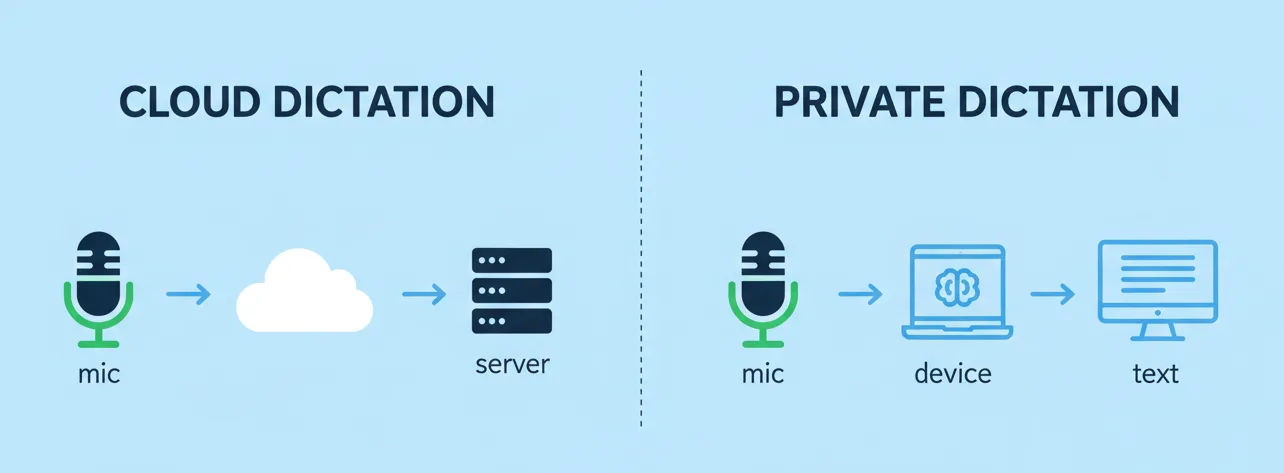
Unlike traditional tools, private dictation software is designed to keep your voice data under your control by processing speech locally on your device instead of relying on the cloud. This is often confused with offline dictation, but the distinction matters. It’s not just about whether you need an internet connection - it’s about where your data goes and who has access to it.
If you’re using voice typing for work, personal notes, or anything sensitive, that difference becomes important quickly. In this guide, you’ll learn how private dictation software works, why privacy is becoming increasingly relevant, and how to choose the right tool for your workflow.
Here’s how private and cloud dictation actually differ in practice:

What Is Private Dictation Software?
Before choosing a tool, it’s important to understand what “private dictation software” actually means.
Privacy-focused dictation tools convert your speech into text without exposing your data to external servers. Unlike standard voice typing tools, which often rely on cloud processing, private speech-to-text software runs locally on your device and keeps your data under your control.
This typically means your audio is processed on-device, not stored externally, and never shared with third parties. In simple terms, your voice stays where it belongs - on your device, not in the cloud.
Why Privacy Matters in Dictation Software
At first glance, this might seem like a small technical detail, but it has real implications. Voice data is more sensitive than most people realize.
When you use dictation, you’re often speaking naturally, which means you might include passwords, personal details, business ideas, or private notes without thinking about it. With many tools, that audio isn’t processed locally - it’s sent to external servers, where it can be analyzed and, in some cases, stored or used for training.
Most users aren’t fully aware that this is happening, which is where the risk comes in. Once your voice data leaves your device, you lose direct control over how it’s handled.
Key privacy concerns
At a deeper level, the risks are fairly straightforward. Voice data can be exposed through data breaches, accessed by unauthorized parties, or handled in ways that lack transparency. In some cases, recordings may also be stored longer than expected or used beyond their original purpose.
If privacy matters to you, cloud-based dictation can quickly become a liability - especially when you don’t have clear visibility into how your data is processed and stored.
How Private Dictation Software Works
So how do private dictation tools avoid these risks in practice?

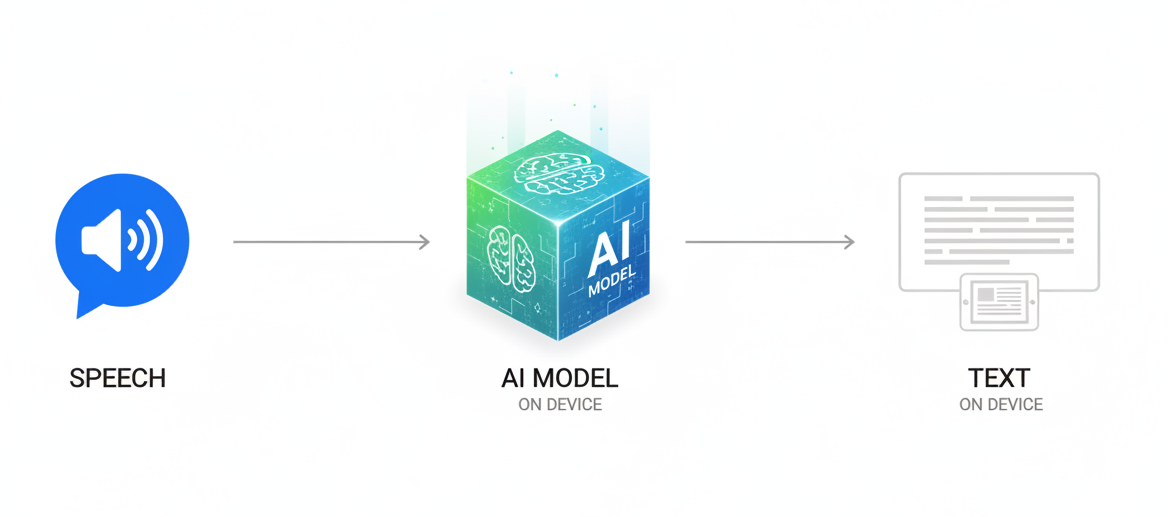
Instead of relying on cloud processing, private dictation software uses on-device AI models to handle speech recognition locally. Your audio is processed directly on your device in real time, without being uploaded or sent to external servers - fundamentally changing how your data is handled.
This approach has become especially practical on modern Macs, where the hardware is powerful enough to run these models efficiently. Tools like Paraspeech, a private dictation app for Mac, take advantage of this by processing everything locally on your device.
If you want a deeper breakdown of the underlying technology, you can read our guide on how dictation software works on Mac.
Private vs Offline Dictation: What's the Difference?
This is where a lot of confusion comes in. Private dictation is often mistaken for offline dictation, but the two are not the same.
Offline dictation simply means that a tool works without an internet connection. Private dictation, on the other hand, is about how your data is handled - it ensures that your voice data stays on your device and isn’t sent or stored externally.
In practice, a tool can work offline and still not be fully private if it stores recordings or processes data in ways that aren’t transparent.
If you want help choosing the right setup, see our guide on how to choose the right Mac dictation software.
| Feature | Private Dictation | Cloud-Based Dictation |
|---|---|---|
| Data processing | On-device | Remote servers |
| Internet required | No | Yes |
| Privacy level | High | Low–Medium |
| Speed | Instant | Depends on connection |
| Data storage | None or local | Often stored |
Most people don’t realize that convenience often comes at the cost of privacy.
Who Needs Private Dictation Software?
So who actually benefits from private dictation?
Private dictation isn’t just for security experts. It’s useful for anyone who wants more control over their data and workflow, especially if you:
- handle sensitive information
- write frequently (writers, developers, founders)
- care about digital privacy
- want full control over how your tools work
Even for everyday use, private voice typing offers an extra layer of peace of mind.
What to Look for in Private Dictation Software

If privacy matters to you, choosing the right tool isn’t just a technical decision - it directly affects how your data is handled every time you use voice typing. Not all tools that claim to be “private” actually meet that standard, so it’s important to look a bit closer at how they work in practice.
A good starting point is how and where your data is processed.
- On-Device Processing
The most important factor is that speech recognition happens directly on your device rather than in the cloud. This ensures that your audio never needs to be uploaded to external servers in the first place. On-device processing is what makes true private dictation possible, because it removes the biggest source of risk: data leaving your control.
- No Data Storage
Even if processing happens locally, it’s equally important to understand what happens afterward. A privacy-focused tool should not store, log, or retain your recordings unless you explicitly choose to do so. The less data that is saved, the lower the risk of it being accessed, leaked, or misused later.
- System-Wide Dictation
Privacy shouldn’t come at the cost of usability. A strong solution should allow you to dictate across your entire system, whether you’re writing emails, taking notes, or working in a code editor. Limiting dictation to a single app often leads to workarounds that can compromise both efficiency and privacy.
- Real-Time Performance
A private setup only works if it’s practical to use. Dictation should feel immediate and responsive, without noticeable delays. Modern hardware makes it possible to run speech recognition locally without sacrificing speed, so privacy no longer has to mean slower performance.
- Transparency
Finally, a trustworthy tool should clearly explain how your data is handled. You shouldn’t have to guess whether your audio is being stored, shared, or processed externally. Clear, transparent communication is often the best indicator that a tool is genuinely built with privacy in mind.
Private Dictation Software for Mac
These requirements become especially relevant on Mac, where modern hardware makes fully private dictation not only possible, but practical. With Apple Silicon, speech recognition models can run directly on your device with enough speed for real-time use, removing the need to rely on cloud processing altogether.
This shift has enabled a new category of tools built around privacy-first design, where voice data is processed locally without ever leaving your machine. If you’re comparing different options, you can explore our breakdown of the best dictation software for Mac.
Tools like Paraspeech, a private dictation app for Mac, are a good example of this approach. Instead of sending audio to external servers, everything runs entirely on-device, so no internet connection is required and your data stays on your Mac. At the same time, it integrates system-wide, allowing you to dictate seamlessly across apps - from notes and documents to development environments - without changing your workflow.

The Future of Private Voice Typing
This shift isn’t theoretical - it’s already happening. Users are becoming increasingly aware of how their data is used, where it is stored, and who has access to it. As a result, expectations around privacy are changing, and tools that rely heavily on cloud processing are being questioned more critically.
At the same time, advances in hardware are making local AI more practical than ever. Tasks that once required powerful servers can now run directly on personal devices without sacrificing speed or accuracy. As these trends come together, private dictation is steadily moving from a niche feature toward a new standard.
Final Thoughts
Private dictation software isn’t just about security - it’s about control. It gives you the ability to decide where your data goes, how it is processed, and who has access to it.
If you use voice typing regularly, choosing a privacy-first solution becomes an important part of building a workflow you can trust. The best dictation tools don’t just convert your speech into text - they do it in a way that respects your data and keeps it under your control.