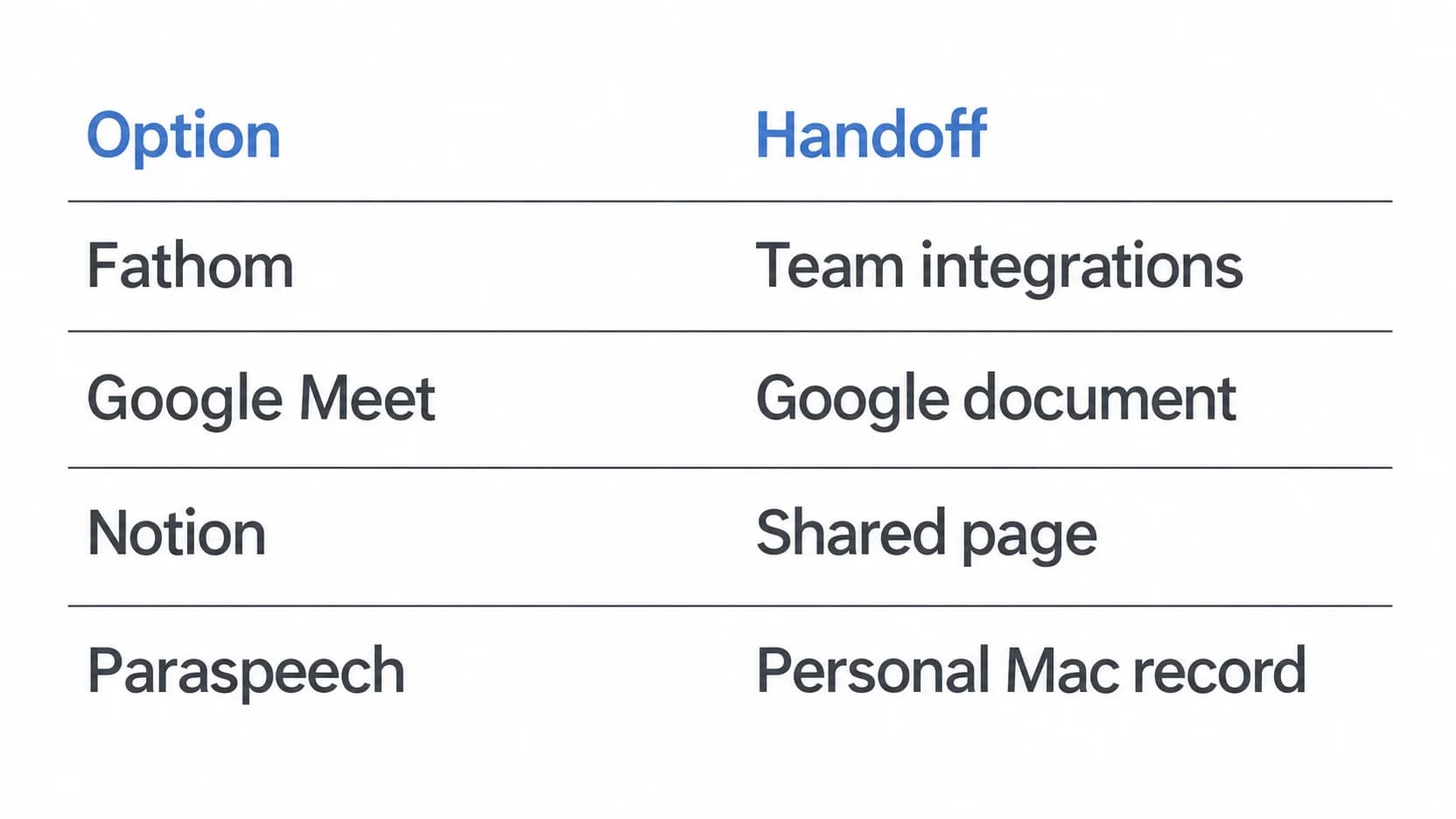
For Discord transcription, first identify the audio: a live voice channel, a posted Voice Message or a recording you already have. For a channel, Craig's documented workflow records audio, then offers text transcription to Tier 3 supporters. A separately authorized Mac meeting workspace is another route when you want your own playback and transcript for review. Choose the source, recording window and text destination before starting.
About this guide: Prepared by Paraspeech. We sell the Mac app discussed below. We are not affiliated with or endorsed by Discord or Craig.
Last checked: October 20, 2026. Instructions come from official documentation and released-product sources. The timed example is invented; no bot installation, Discord call or native compatibility test was performed for this guide.
Identify the Discord audio source
A voice channel is a conversation people can enter and leave. Discord describes joining by selecting the channel, without calling or ringing. Decide which part of that ongoing conversation the recording should cover. A channel name alone does not identify the start and end of the record you need. Discord's channel guide.
A Voice Message is an audio recording posted in a conversation. Discord currently supports sending these from its mobile app and listening on desktop or mobile. Treat a particular posted message as its own source. If your transcription tool needs a file, ask the sender for an authorized audio copy rather than assuming that a channel recorder included it. Discord's Voice Messages guide.
An existing recording starts with its owner and file. If someone already captured the discussion and can share it, use that authorized source and the saved-audio transcription workflow. Speaking a new typed message into Discord's composer is a different task; the dictation versus transcription guide explains that distinction.
Record the channel with a bot, then request text
Craig documents a channel-recording workflow with a separate audio track for each speaking user. That suits an organizer who needs the recording's individual voices for editing, as well as a possible transcript afterward. Craig's recording overview.
Arrange permission for the recording, processing and intended audience before capture. Discord's Connect permission allows joining a voice channel; Speak enables microphone use. Those technical permissions do not establish participants' agreement to create or distribute a saved copy. Discord's permission definitions.
For Craig's documented setup:
- Have the authorized organizer check bot access. Craig lists Send Messages, Connect and Change Nickname as required permissions. Its access roles control who can record; configuring those roles requires Manage Server. Required permissions, access roles.
- Check current voice compatibility. Discord requires third-party voice applications and bots to implement DAVE after March 2, 2026. Confirm the chosen bot's current support before relying on an older setup guide. This requirement alone does not verify a particular bot connection. Discord's current voice requirements.
- Join the intended voice channel and use
/join. Craig also documents specifying a channel in that command. Keep the agreed capture interval clear when other members arrive. - After recording, use the recording information sent by DM to reach its download page. If that message is unavailable, Craig documents
/recordingsfor obtaining the link. Choose the recording format and allow processing to finish. Craig's start and download instructions.
Get the text from a non-expired recording
Craig's built-in transcription requires Tier 3 supporter access. For an eligible, non-expired recording, open its download page and look for Transcription. The documented outputs are WebVTT, SRT and plain text. Having an audio download does not establish that this premium text feature is available. Craig's transcription instructions.
The same documentation says Craig uses Faster Whisper and Runpod for transcription processing. Include that processing step in your recording agreement. An open-source speech model name does not make the hosted transcription a local operation.
Keep the outputs you need before the recording expires
Craig's homepage lists recordings of up to six hours, kept for seven days. Its setup page also documents longer supporter limits. Check the current limits for your access instead of applying the standard retention period to every recording. Obtain the audio and any needed text while the recording remains available. Standard limits, supporter differences.
Choose plain text for reading or preparing notes. Choose a timed format when a captioning destination requires it, then check the result against that recording. A multitrack audio download, a readable transcript and a timed subtitle file serve different purposes; keep the actual output your next step needs.
Discord's DAVE requirement concerns participation in voice. A bot's saved audio and its later transcription introduce additional processing and storage choices. Agree on those choices and the audience for the resulting files, rather than extending the voice-transport rule into a promise about every saved copy.
Match the saved copy to the conversation window
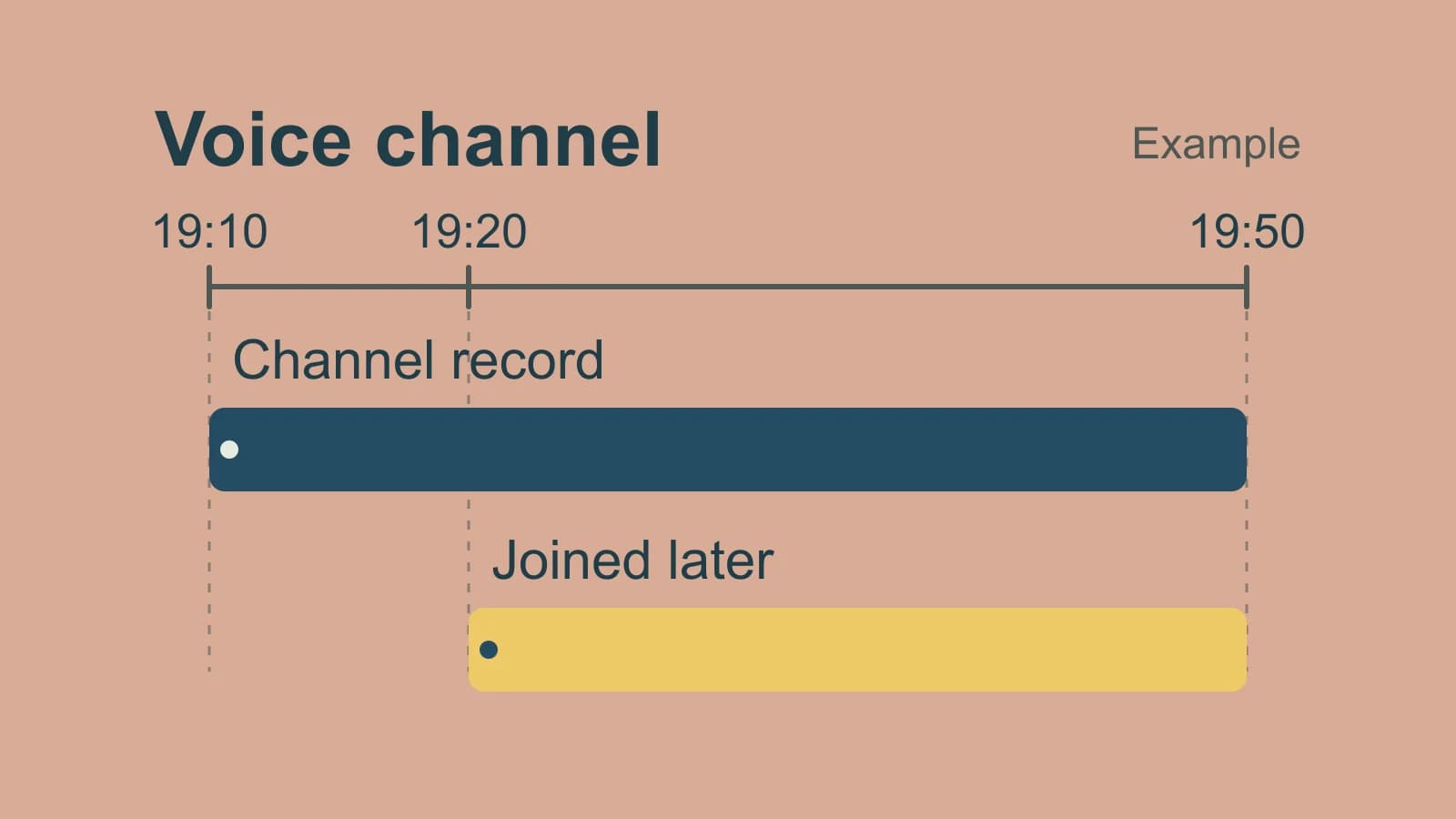
Consider this invented example, rather than an observed bot or app result. Your community agrees to record a discussion from 19:10 to 19:50. An organizer starts the channel recorder at 19:10. You join at 19:20 and start your own permitted Mac recording then. Someone had also posted a Voice Message at 18:55.
| Source | What it can supply in this example |
|---|---|
| Channel recording, 19:10–19:50 | The agreed 40-minute discussion, if capture succeeded |
| Your recording, 19:20–19:50 | Your 30-minute captured interval; the first ten minutes remain outside it |
| Voice Message posted at 18:55 | That separate message, obtained from its own authorized source |
For a recap covering the whole agreed discussion, request the organizer's authorized record. If you use only your later recording, label its coverage. Add the earlier Voice Message separately if the recap needs it and sharing is permitted. A transcript can help you find speech within its source; it cannot supply the earlier interval that source never captured.
This also changes which route is sufficient. Personal review of the last half-hour may be satisfied by your own archive. A complete community record still depends on the earlier channel capture and the intended sharing destination.
Keep a separate Mac review record
Paraspeech's documented Meeting Mode provides a Mac workspace with playback and a speaker-aware transcript. It can capture your microphone and system audio. This is a route for an agreed participant record; it does not join a server as a bot or automatically post a transcript into Discord. Meeting Mode documentation.
On a supported Apple Silicon Mac running macOS 14 or later, finish local speech and speaker-model setup, allow microphone access, and grant the required Screen Recording permission for system audio. In Meetings, choose Start Meeting at the agreed start and Stop Meeting at the end. Each recording can last up to four hours. Confirm that the resulting playback includes the local and remote contributions you intend to review; a successful Discord connection alone does not establish that both reached your saved recording.
After you stop, Meeting Mode automatically attempts a cloud-generated summary and sends transcript text for processing. Its meeting recordings and summaries are separate from Privacy Mode's dictation controls. Include this processing and retained archive in the permission you arrange; selecting local speech does not make the entire meeting workflow offline.
Review speaker attribution before attaching Discord handles to the text. Acoustic speaker labels do not establish which account spoke; the speaker diarization guide explains that boundary. For a recap, work from the reviewed transcript using the meeting-summary guide.
If this separate review workspace fits your agreed capture, download Paraspeech and complete the Meetings setup before the conversation. Set a capture window within its four-hour limit and plan where the reviewed result will go. Choose a channel-bot workflow when the required result is a server-organized recording or its documented transcript output.