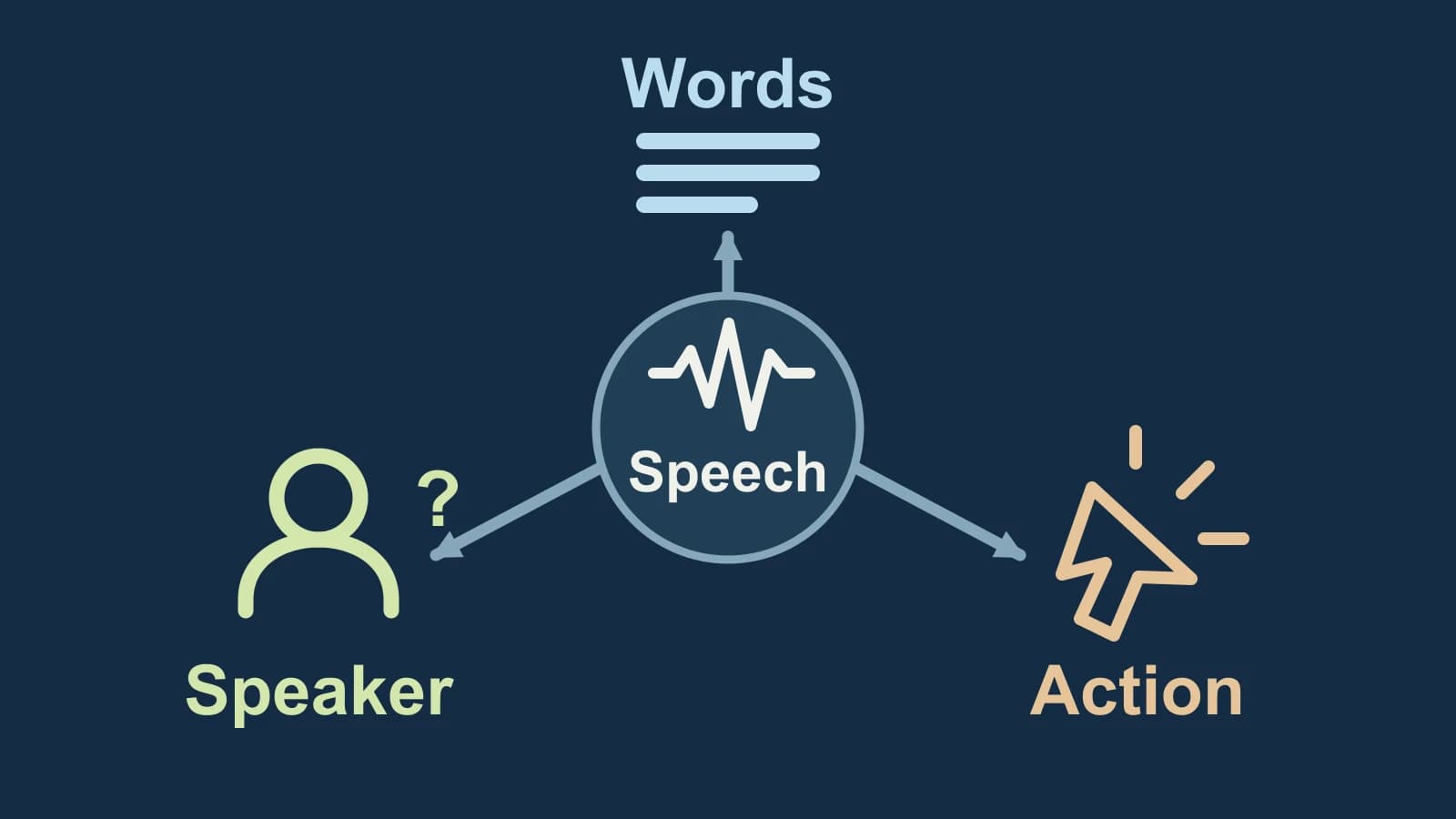
Speech recognition concerns the words being spoken; “voice recognition” can mean speech input or recognition of a speaker. In speech recognition vs voice recognition, choose by the documented result: a transcript, a comparison against a known-speaker reference, or a supported command action.
The same application can offer more than one of these capabilities. A feature name does not establish which result you will receive, or what a request to train it on your voice is intended to do.
Prepared by Paraspeech, which sells the Mac dictation app mentioned below. This explanation uses linked documentation and an authored thought experiment, not hands-on findings. Paraspeech is not affiliated with or endorsed by the organizations named here.
Last checked: October 20, 2026.
The same label can describe different jobs
AWS describes speech recognition as converting spoken language into text. You will also see this called automatic speech recognition, or ASR. That is the capability to look for when you need the words from a spoken note or an audio recording.
AWS uses voice recognition more narrowly for recognizing a particular speaker. Yet Microsoft’s legacy recognition setup page uses the same label for Windows speech-input software and voice training. Microsoft now notes that voice access replaced Windows Speech Recognition on Windows 11 22H2 and later in September 2024; these are historical setup instructions, rather than a current Windows 11 walkthrough.
Read the feature description after the name. A promise to produce editable text answers a different requirement from a promise to compare a voice with a known speaker. An instruction to speak a training passage does not, by itself, tell you which requirement the setup serves.
If your starting material is text and you want spoken audio, the task goes in the other direction: text-to-speech.
Change one part of the speech
The following cases are an original thought experiment. Mira and Remy are fictional speakers; no audio was recorded and no system produced these results.
Keep the words, change the speaker
Imagine Mira saying, “The folder is ready.” Now imagine Remy saying the same sentence.
For a transcription task, both cases call for the same intended words. Changing the speaker should not change which sentence you are trying to capture.
For a speaker-verification task using Mira’s reference voice, the two cases present different speakers to compare with that reference. Correctly recognizing the sentence cannot settle that comparison: Remy can say exactly the same words.
Keep the speaker, change the words
Now imagine Mira saying, “The folder is missing.”
The word-recognition task has changed. A useful transcript must preserve missing rather than ready. The speaker-reference question still concerns Mira, even though she says something different.
That does not predict whether a real verification system would accept either recording. Some tasks require a predetermined phrase; AWS distinguishes those from text-independent speaker recognition. For a fixed-phrase task, both the voice and the required words matter. Check the documented task before assuming a different sentence is an eligible input.
This gives you a way to interpret a vague feature claim. If changing ready to missing is what matters, specify the required words in the text result. If changing Mira to Remy matters even when the sentence stays identical, specify the known-speaker comparison you need. A product may supply both, but evidence for one does not establish the other.
Read the purpose of the setup
A request to learn your voice can sound like an identity feature. In Microsoft’s legacy setup, the stated purpose of training is to help speech recognition understand you. Contrast that with the target-speaker detection task in NIST’s 1999 evaluation overview: test speech is evaluated against a known target speaker using reference material. These ask different questions, even though both involve speech from a person.
Before treating a voice-setup step as verification, look for a documented comparison to a known speaker and what its result means. Better recognition of your words does not establish that identity decision.
A label such as “Speaker 2” is another separate result. It can organize turns without establishing the person’s name. Use the speaker diarization guide when your problem is keeping voices and turns consistent in a conversation transcript.
Commands add an action requirement. Apple’s Voice Control guide distinguishes dictation mode from command mode; command mode responds to commands and ignores words that are not commands. A transcript containing “Open Mail” is therefore different evidence from the Mail app actually opening. To control an app, you need a supported command in the appropriate mode, rather than text recognition alone. The Mac speech-input setup guide covers the built-in input and control choices.
When you need text on your Mac
If editable text is your required result, Paraspeech supplies a dictation route on macOS 14 or later. Choose an eligible plan or trial before ordinary post-onboarding use. Supported local speech requires Apple Silicon and a downloaded, ready model; eligible Intel workflows use cloud processing.
After granting Microphone and Accessibility permissions, focus an editable field, hold your recording shortcut, speak, then release. Control is the default shortcut. Review the inserted sentence, including meaning-changing words such as ready and missing. Use manual copy and paste when a destination does not support insertion.
For recognition text without an AI rewrite, select Rewrite → Default Output → Transcription Only, then inspect App Exceptions for a different output choice in the destination app. This skips AI rewriting; other normalization can still occur. Check speech, rewriting and any cloud fallback separately when processing location matters.
If this is the text-output branch you need, download Paraspeech and configure it using the setup documentation. For software selection, continue with the Mac dictation app guide. A requirement for speaker verification or supported device commands calls for a feature explicitly documented for that job.